![Clear space Logo_Navy-4.png]](https://help.getaglow.co/hs-fs/hubfs/Clear%20space%20Logo_Navy-4.png?height=50&name=Clear%20space%20Logo_Navy-4.png)
The one thing to understand before you start
Memberships create three different numbers, and they never match on any given day. That's not a bug, and it's not a Timely problem or an aglow problem. It's how instalment memberships work everywhere. Once you know which number answers which question, the reports stop being confusing.
Here are the three:
- Membership sold. The price the client signed up to pay for their membership. You'll see this the moment you make the sale in Timely, and it matches the total on the package and in their member agreement. It's a promise of cash to come, not cash you've received.
- Cash collected. What's actually landed in your account. aglow collects this in equal instalments across the term, so on day one this is close to zero even on a $3,000 membership.
- Treatments delivered. The value of the treatments your clients have actually had. This builds up over the term, one visit at a time, as people come in.
Think of a gym that sells a $1,200 annual membership paid monthly. The day someone signs, the gym has sold $1,200 of membership, collected about $100, and earned nothing yet because the member hasn't worked out. All three numbers are correct. They're just answering different questions.
The mistake that causes panic is reading "membership sold" as "cash collected." If you sell three $1,000 memberships on Monday, a payment report can show $3,000 sold that day even though almost none of it has reached your bank. Nothing has gone wrong. You're looking at the sale value, not the cash.
Keep those three numbers in separate boxes and everything below will make sense. Now let's set one up.
Part 1: Setting up and selling an aglow membership
Step 1: Create your package
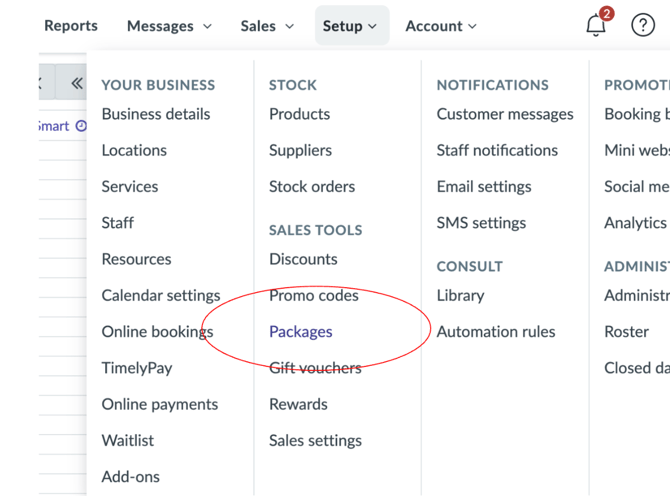
Head to Setup → Sales tools → Packages in your Timely navigation.
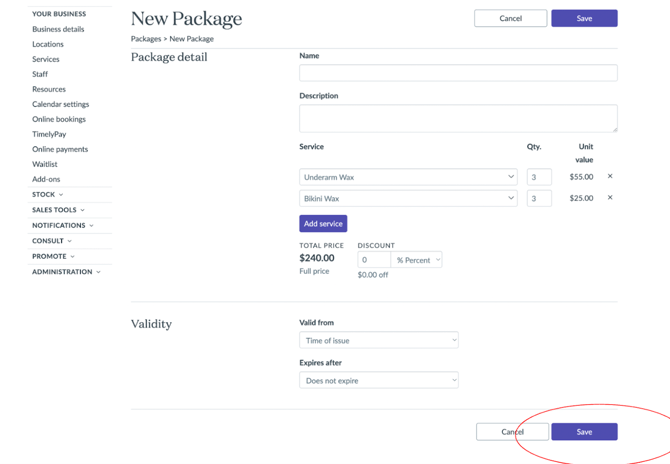
Click New Package and fill in the details:
- Give it a clear name
- Add the services included, along with the quantity of each and the unit value
- Set a validity period, either from the time of issue or a fixed date range
- Save it
A quick note on naming conventions
How you name your package depends on which type of aglow membership you're creating, and it's worth getting this right from the start.
If you're setting up a subscription (a standard membership you'll offer to lots of clients), name it after the membership itself. Something like "Monthly facial membership" or "Lash infill club". You create it once and sell it over and over.
If you're building a treatment plan (a personalised programme created during a client consultation), name it after the client. Something like "Sarah Brown treatment plan". You sell it once, to Sarah, and that's the point. It won't be reused for anyone else because it's bespoke to her goals, her timeline, and her recommended treatments.
Creating a separate package per client feels clunky, but it's the cleanest way to track each treatment plan accurately inside Timely. Once a plan is complete and every session has been redeemed, archive or delete the package in Timely to keep your list tidy. Build that into your end-of-plan routine so the list stays manageable as your programme grows.
Step 2: Add the membership to a sale
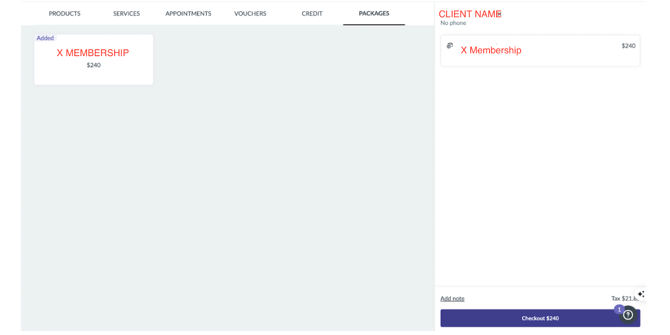
When a client signs up, open a new sale for them in Timely and go to the Packages tab. Your memberships are listed there. Click the one you want to open the package details, check the summary and total price, then hit Add to sale.
You'll be prompted to select a staff member, and from there it appears in the sale ready to check out.
out.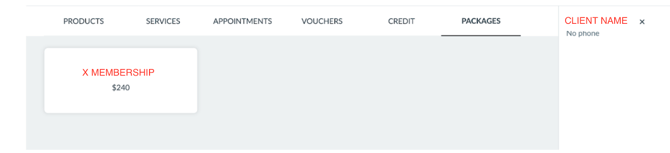
Checking out a membership sale
Once the package is added, you'll see the total on the right-hand side. Hit Checkout to move to the payment screen.
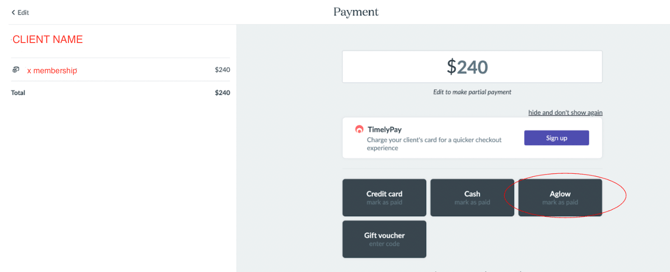
Here's the important bit: check the client out using the aglow payment button. Not credit card. Not cash. This is the single most important step in the whole process, and getting it wrong is the number one cause of reports that look wrong later.
Using the aglow payment type keeps all your membership sales on one filterable line, separate from your real card and cash takings. If you mark a membership as cash or card instead, you drop the full membership value into your actual takings as though the money had arrived, when aglow is really collecting it over months. You then can't filter it back out, and every report you pull afterwards is muddled. A few minutes of care here saves hours of confusion at month end.
To add the aglow payment type, follow Timely's guide: How to create your own payment types.
Once it's set up, aglow appears alongside your other payment options at checkout. Select it, review the summary, and tap Complete to finish the sale.
Part 2: Tracking redemptions
When a client comes in for a treatment, add the relevant service to their appointment as normal. When you check them out, Timely applies the redemption against their package balance automatically.
Each redemption appears in your Executive Summary report as a service sale, but only at the point it's redeemed, not when the membership was bought. This is the "treatments delivered" number from the top of the guide, building up treatment by treatment as clients walk through the door.
Part 3: Reading your reports without second-guessing yourself
This is where the three numbers earn their keep. Here's exactly where each one lives and what it's telling you.
When a membership is sold
Timely records a new membership as a package liability, not a service sale. You'll find it in the Invoice Detail report (Sales → Reports → Invoice Detail). The liability sits there until treatments are redeemed. This is standard deferred-revenue accounting, and it's exactly how it should work.
If that feels abstract, think about a gift voucher. When you sell a $500 voucher, your reports don't count it as $500 earned that day. It sits there until the client comes in and uses it, and the value counts as they redeem it. A membership behaves the same way. The value shows at the point of sale, but it's only earned as treatments are delivered.
In your Executive Summary report, only the GST portion appears under "Package sales" at the time of purchase. The rest of the revenue shows up as treatments are used.
So at the moment of sale: the membership is sold, the revenue hasn't been earned yet, and the cash hasn't been collected yet. All three boxes, doing their own thing.
When treatments are redeemed
Each time a client uses their membership, that treatment value appears in the Executive Summary as a service sale against the relevant staff member. The value counts when the treatment is delivered, not when the membership was bought.
Where your cash actually is
aglow collects membership payments in equal instalments across the term. Treatments aren't always equal in value, and that's fine.
Say a client's plan collects $100 per week, and they redeem a $500 treatment in month one. Timely shows $500 redeemed while aglow has collected roughly $400 so far. That gap is completely normal. By the end of the term the two numbers reconcile as the instalments catch up.
Which report answers which question
When you want to check where things stand, go straight to the right report instead of trying to make one number do everything:
- How much membership have I sold? Timely's Sales report → Packages purchased. This confirms memberships sold and their total value. This is membership sold.
- How much cash have I actually collected? Your aglow payout report, which reflects payments collected to date minus our service fee. This is cash collected, and it's the only number that tells you what's in your bank.
- How much value have I actually delivered? Timely's Executive Summary. This is treatments delivered.
The golden rule: never add membership sold and cash collected together. They're measuring different things at different points in time, and adding them double-counts money that mostly doesn't exist yet.
Part 4: Keeping instalments and redemptions in comfortable alignment
The gap between what's been collected and what's been redeemed is normal, but you can keep it small with a bit of planning. Smaller gap, fewer surprises.
Book all appointments upfront
Scheduling every appointment at the start of the membership lets you place higher-value treatments towards the end of the term, when more instalments have already been collected. It also locks clients into their appointments from day one, which is great for retention and cuts drop-off.
Handling a high-value treatment early in the plan
Sometimes a client wants to redeem a big-ticket treatment near the start, before enough instalments have come in to cover it. The cleanest fix is sequencing: where you can, book the expensive treatments later in the term so the cash is already there.
If a treatment genuinely has to happen early, take a deposit at sign-up before the membership begins. Subtract that deposit from the total membership cost so the client never pays twice. For now this is handled in Timely at the point of sale, outside aglow.
One thing to watch: a deposit taken through Timely is real cash arriving outside the aglow payout report, so it sits outside the three-number model above. Note it somewhere when you take it, and remember it's already accounted for when you reconcile at month end. Use deposits as the exception, not the routine, and lean on sequencing first.
The five-minute monthly check-in
At the end of each month, pull your Timely Sales report and your aglow payout report side by side. It takes five minutes and shows you where redemptions and collections sit relative to each other. If treatments are running ahead of payments, that's your prompt to look at upcoming bookings and adjust the sequencing.
Most clinics find this becomes second nature quickly. And if anything ever looks off, we're here to help you work through it.