![Clear space Logo_Navy-4.png]](https://help.getaglow.co/hs-fs/hubfs/Clear%20space%20Logo_Navy-4.png?height=50&name=Clear%20space%20Logo_Navy-4.png)
Part 1: Setting up and selling an aglow membership
Step 1 - Create your package
Head to Setup → Sales tools → Packages in your Timely navigation.
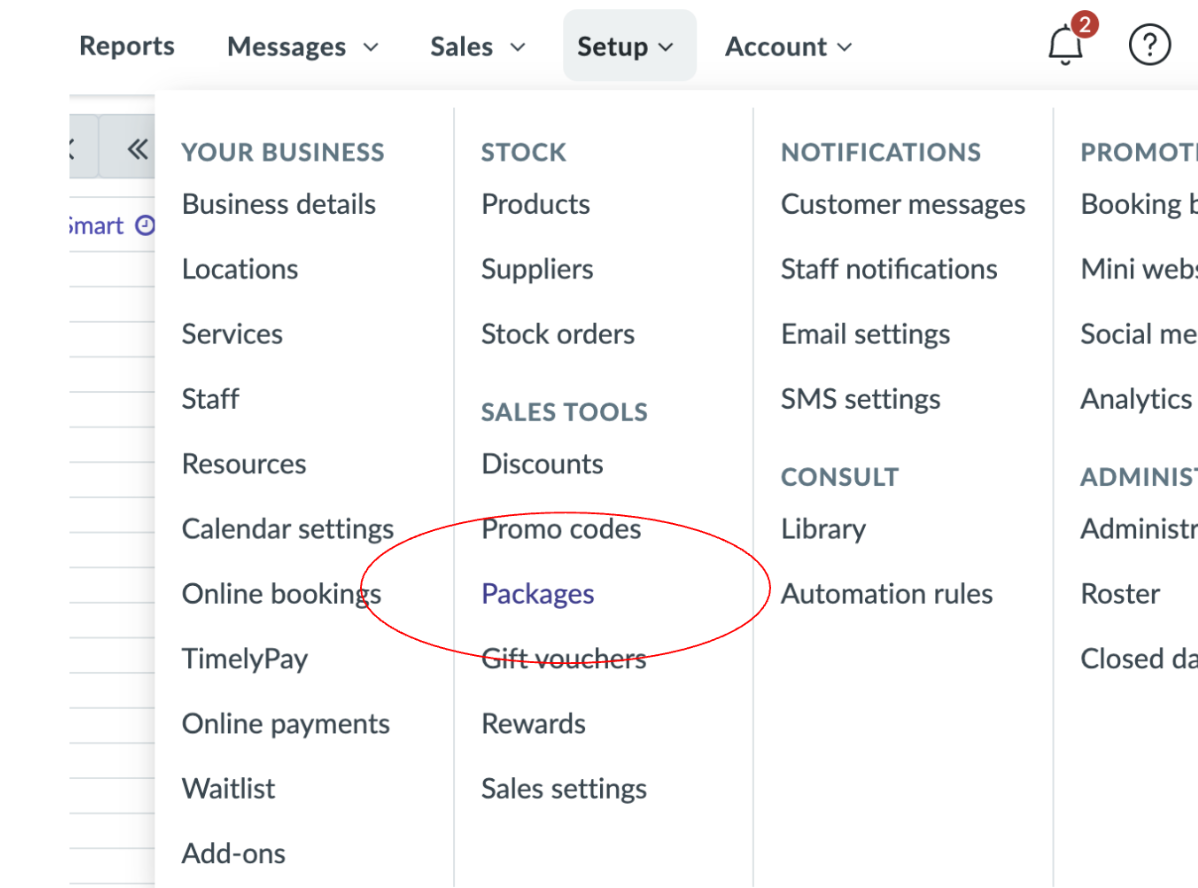
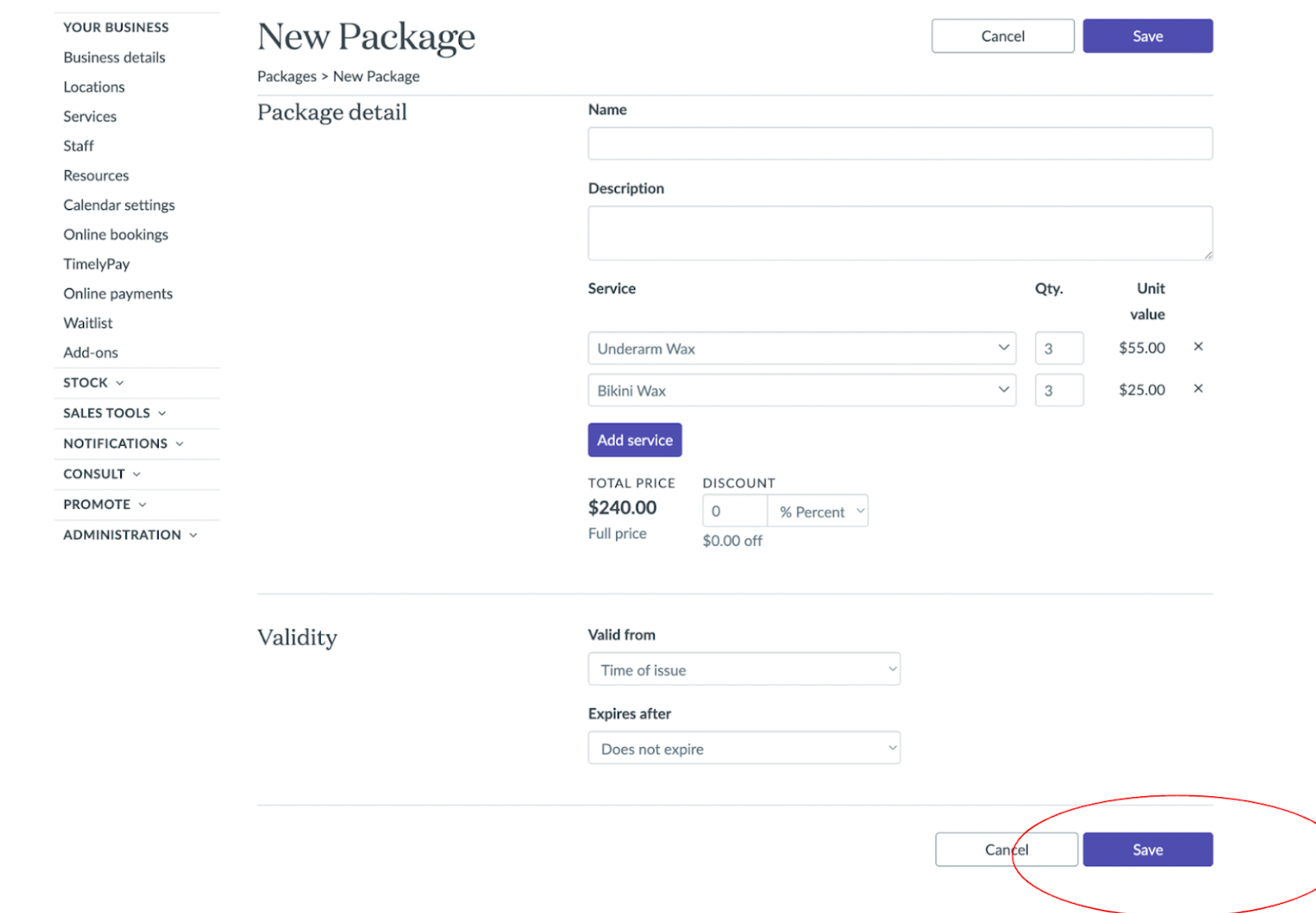
Click New Package and fill in the details:
- Give it a clear name
- Add the services included, along with the quantity of each and the unit value
- Set a validity period – either from the time of issue, or a fixed date range
- Save it
A quick note on naming conventions
How you name your package depends on which type of aglow membership you're creating – and it's worth getting this right from the start.
- If you're setting up a subscription (a standard membership you'll offer to multiple clients), name it by the membership itself. Something like "Monthly Facial Membership" or "Lash Infill Club." You'll create it once and sell it over and over again.
- If you're building a treatment plan (a personalised programme created during a client consultation), name it after the client. Something like "Sarah Brown – Treatment Plan." You'll sell it once, to Sarah, and that's the intention. The package won't be reused for other clients – it's bespoke to her goals, her timeline, and her recommended treatments.
It might feel a little clunky to create an individual package per client, but it's the cleanest way to track each treatment plan accurately inside Timely.
Once a treatment plan is complete and all sessions have been redeemed, you can archive or delete the package in Timely to keep things tidy. It's worth building this into your end-of-plan process so your package list stays manageable – especially as your membership programme grows.
Step 2: Add the membership to a sale
When a client signs up for a membership open a new sale for them in Timely and navigate to the Packages tab. You'll see your memberships listed there. Click on it to open the package details – you'll see a summary of what's included and the total price – then hit Add to sale.
You'll be prompted to select a staff member, and from there it'll appear in the sale ready to check out.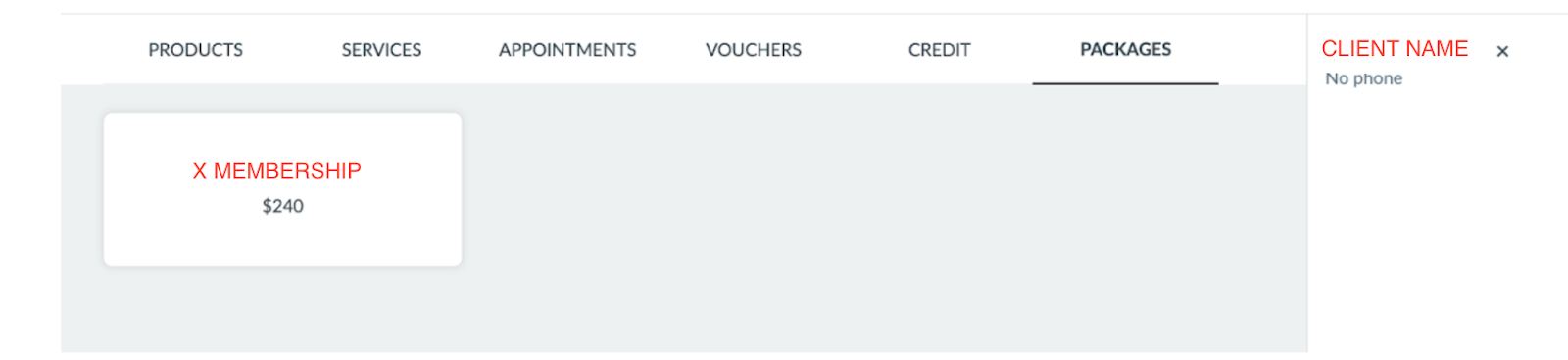
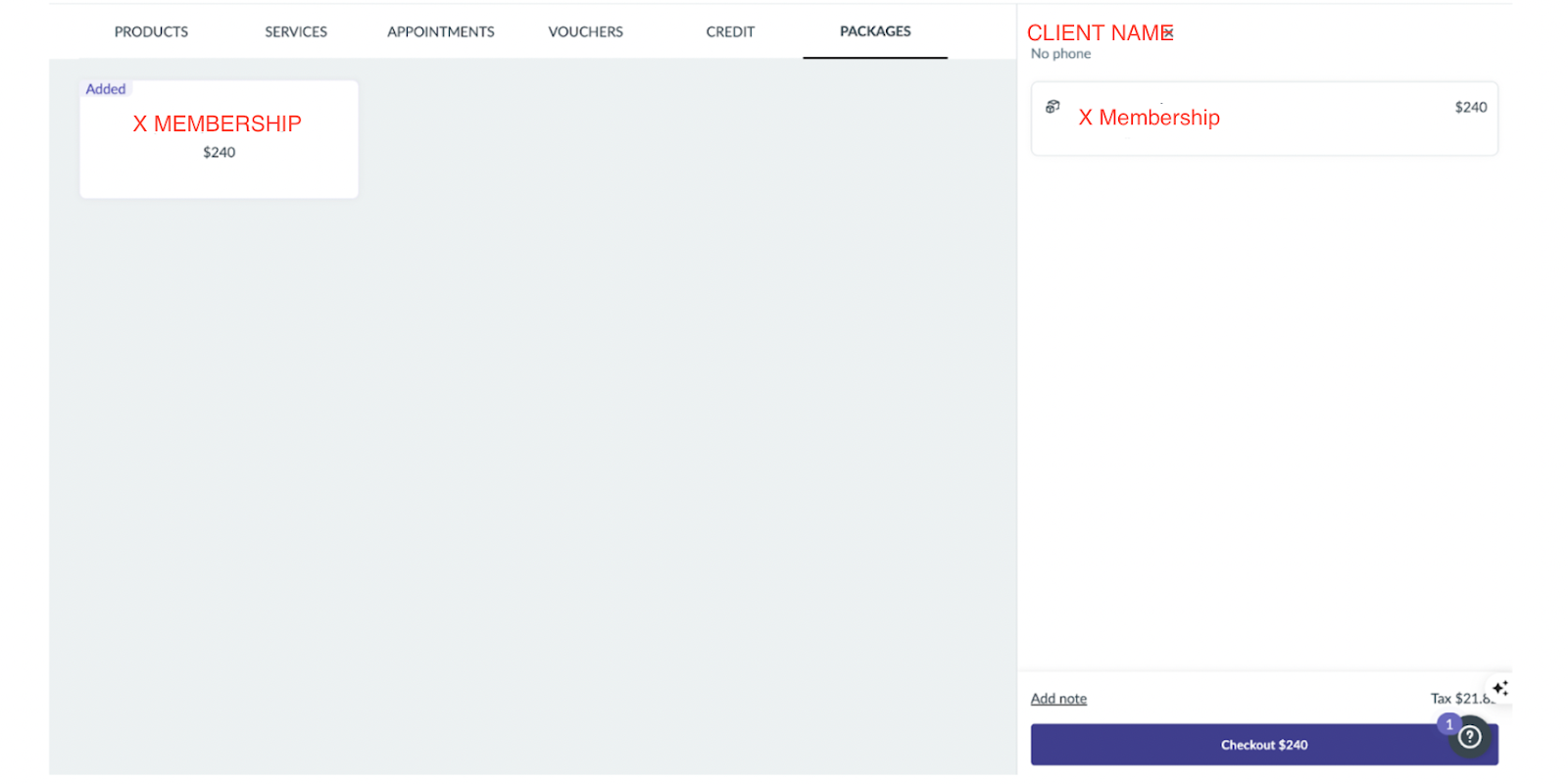
Checking out a membership sale
Once the package is added to the sale, you'll see the total on the right-hand side. Hit Checkout to move to the payment screen.
Here's the important bit: you need to check the client out using the aglow payment button – not credit card, not cash. This keeps your reporting clean and makes reconciliation straightforward later on.
To add the aglow payment type, follow Timely's guide here: 👉 How to create your own payment types
Once it's set up, you'll see aglow appear alongside your other payment options at checkout. Select it, review the summary, and tap Complete to finish the sale.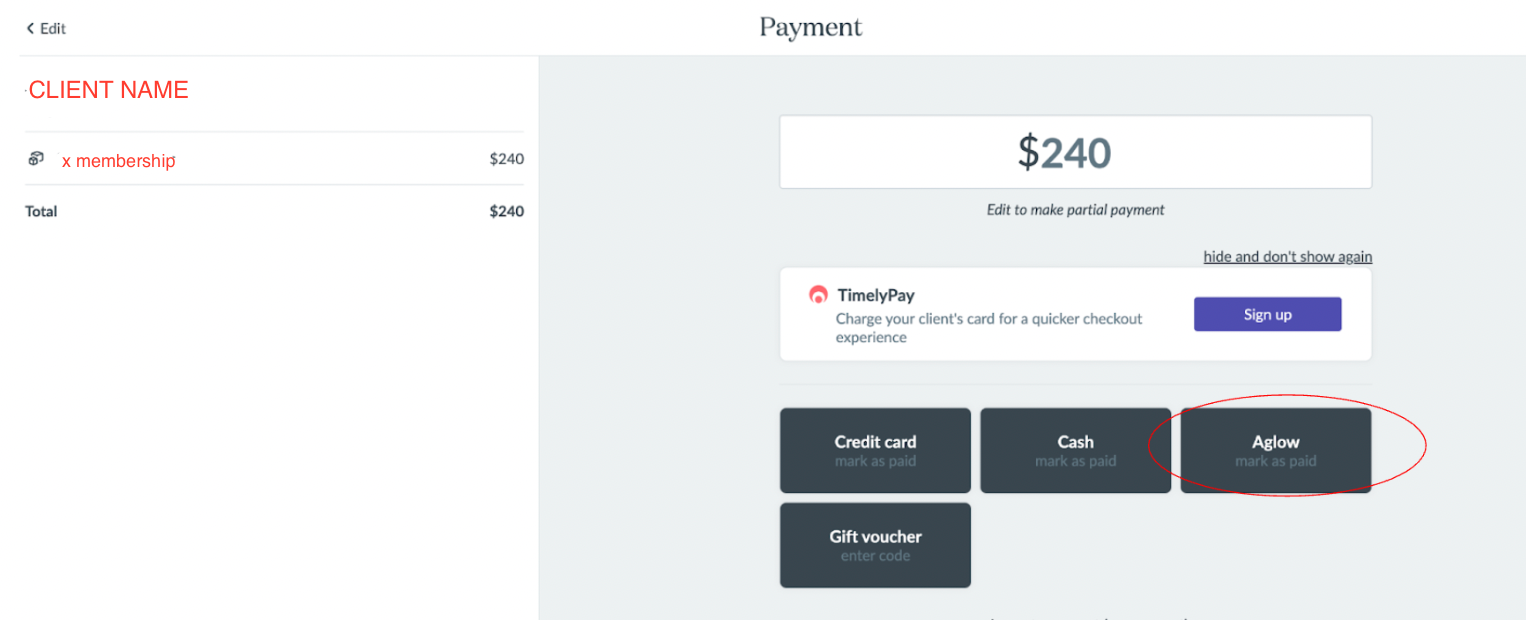
Part 2: Tracking redemptions
When a client comes in for a treatment, you add the relevant service to their appointment as normal. When you check them out, Timely will apply the redemption against their package balance automatically.
Each redemption will appear in your Executive Summary report as a service sale – but only at the point it's actually redeemed, not when the membership was purchased. This is worth knowing so the numbers make sense when you're reviewing your reports.
Part 3: Keeping your Timely reports and aglow payouts in sync
Once you understand how Timely records membership revenue, this all makes sense. Here's what to expect.
When a membership is sold
Timely records a new membership as a package liability rather than a service sale. You'll see this in the Invoice Detail report (Sales → Reports → Invoice Detail). The liability sits there until treatments are redeemed – this is standard accounting behaviour for deferred revenue, and it's exactly how it should work.
In your Executive Summary report, only the GST portion appears under "Package sales" at the time of purchase. The rest of the revenue shows up as treatments are used.
When treatments are redeemed
Each time a client comes in and uses their membership, that treatment value appears in the Executive Summary as a service sale against the relevant staff member. Revenue is recognised as it's earned – when clients actually walk through the door.
How aglow payouts work alongside this
aglow collects membership payments in equal installments across the term. Treatments, though, aren't always equal in value – and that's fine. If a client's plan collects $100 per week and they redeem a $500 treatment in month one, your Timely report will show $500 redeemed while aglow has collected $400 so far. That gap is completely normal. By the end of the membership term, the two numbers will reconcile as instalments catch up.
To cross-reference what's been collected versus what's been redeemed at any point:
- Timely's Sales report → Packages purchased: confirms memberships sold and their total value
- Timely's Invoice Detail report: shows individual redemptions and package liabilities
- Your aglow payout report: reflects payments collected to date, minus our service fee
Sequencing treatments to stay ahead
The simplest way to keep instalments and redemptions in comfortable alignment is to think about treatment timing when you set up the membership.
Book all appointments upfront. Scheduling at the start of the membership lets you place higher-value treatments towards the end of the term – when more instalments have already been collected. It also means clients are locked into their appointments from day one, which is great for retention and reduces drop-off.
If a client wants to redeem a higher-value treatment early in the plan, take a deposit at sign-up before the membership begins. That deposit is subtracted from the total membership cost so the client isn't paying twice. For now this is handled via Timely at the point of sale, outside of aglow – but it means you're covered from the start.
Monthly check-in
At the end of each month, pull your Timely Sales report and aglow payout report side by side. It takes five minutes and gives you a clear picture of where redemptions and collections sit relative to each other. If treatments are running ahead of payments, it's an easy prompt to review upcoming bookings and adjust sequencing if you want to.
Most clinics find this becomes second nature pretty quickly. And if anything ever looks off, we're here to help you work through it.